
Built for
everyone
More access.
A more open web.
Give more people a clear, welcoming way to find what they need on your website.
Our approachMeet Sairo. An AI website chatbot that answers from your content and brings in your team when a visitor needs a person.


Try the live demo
Give Sairo your web address, then ask a question. See a live assistant built from your own public pages.
No signup. Nothing to install.
The demo reads a small sample of your site. Verify your domain to connect the full website.
Built for
everyone
Give more people a clear, welcoming way to find what they need on your website.
Our approachReal impact
Sairo on film
Five narrated films, one for each part of the product, with captions, chapters and a full transcript. Start with the question you came here with.
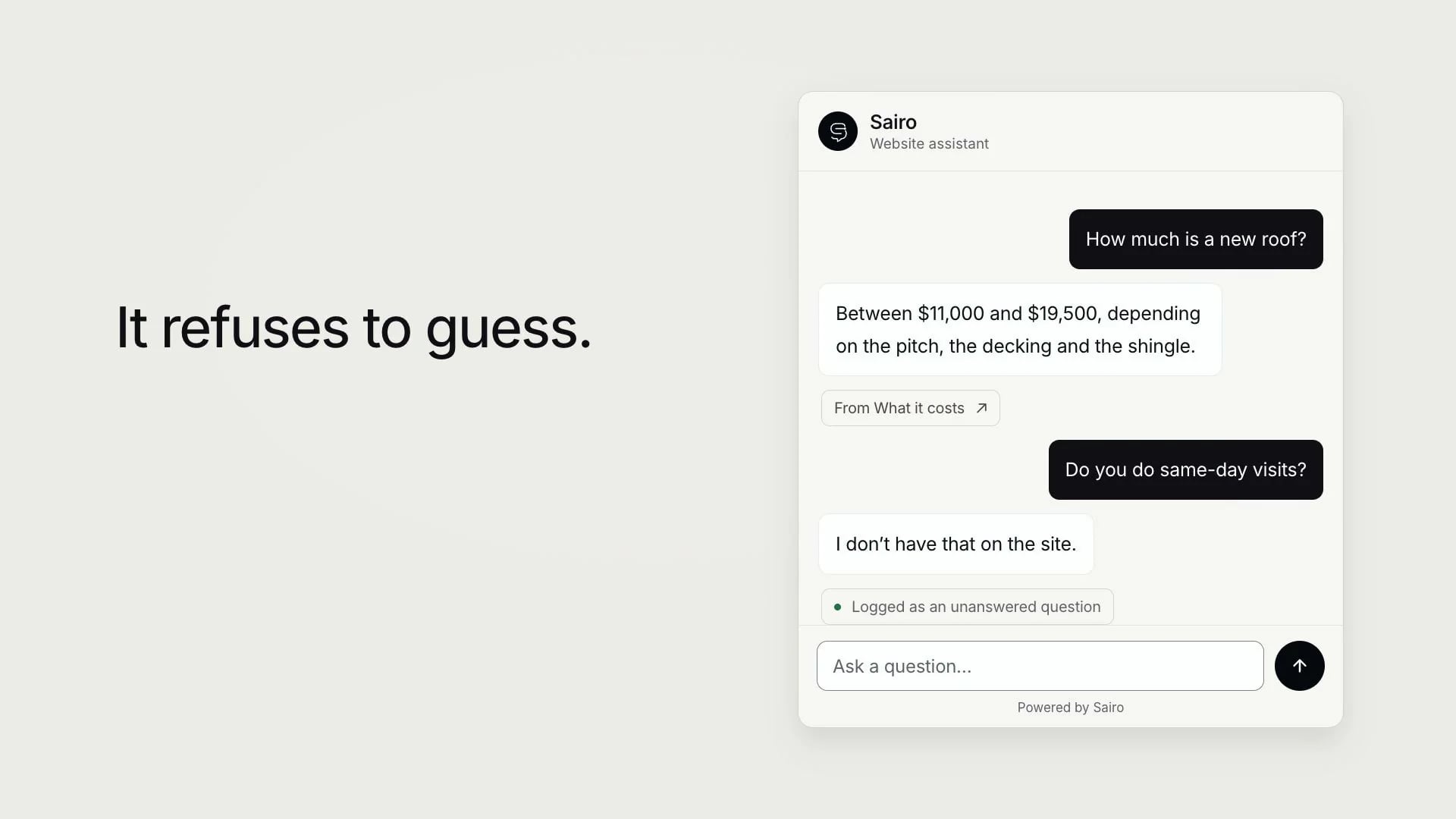
Film 01 · Website knowledge · 1:56
Sairo reads the pages you choose, answers visitors from them and shows the source page. When your site doesn’t cover something, it says so and records the question for your team.
Choose a film
Narrated in an AI voice. The interface is recreated for film from Sairo’s own screens and copy; the businesses, visitors and figures are fictional examples.
Your knowledge, made useful
Sairo turns selected website pages, documents and approved answers into a knowledge base for your AI chatbot. Visitors can ask about your services, prices and policies in their own words. Your team chooses the sources and keeps them current.
A useful answer includes the published scope and available starting price, with its unit, minimum charge and conditions. See how pricing answers work.
When a source cannot confirm a detail, the answer should make that limit clear. Review the question, update the knowledge and test the answer’s accuracy.

Add and verify your domain. Choose the pages that should inform your assistant, then check the information it finds.
Set your greeting, brand colours, and conversation goals. Try the questions your visitors are most likely to ask.
Add the Sairo script to your site. Test it in your theme, invite your team, and start the conversation.
AI and your team, together
When a visitor needs a person, let your team step into the same conversation. The questions, the answers, and the context come with them.
Discover live chat
The earlier questions and answers stay in the transcript. Visitors can continue right where they left off.
Assign specialists to each website and let them choose when they’re available to take a conversation.
When nobody is online, visitors can leave a message for your team. Their request stays with the conversation.
A little more understanding
Discover what people need, where they get stuck, and what deserves a closer look. Turn everyday conversations into a more useful website.
Explore your insightsYour team stays in control.
Site knowledge and conversations follow your workspace permissions.
An answer needs updating. A visitor needs a follow-up. Tell Ask Sairo what needs attention and work through it in one conversation, with the context close at hand.
We now offer Saturday consultations, by appointment. Help me update that answer.
Here’s the proposed answer for your website. Review the wording, save it, then check the original question again.
Add Sairo to the site you already have. Find your platform, follow the installation guide, and make it your own.
AI answers and live chat from Free. Your brand on every paid plan. Compare Sairo’s included features, prices and allowances with Intercom, Tidio and Chatbase, side by side.
Compare features & pricesActual prices and plan limits. Published by Sairo, with dated sources and clear billing assumptions.
Yes. Paste your web address into the live demo. Sairo reads a small sample of your public pages and builds an assistant you can ask questions. There’s no signup and nothing to install for the demo.
Sairo uses relevant content from the website pages you connect, along with confirmed business details and saved answers. You choose the sources and can review and update them as your information changes.
For a specific service enquiry, Sairo is designed to explain the service and include its published starting or standard price when available. The answer should keep the billing unit, applicable scope, minimum charge, currency and tax treatment together. A final quote still needs the information and approval your business requires.
Use real questions with known answers and compare each reply with the current source. Check the full question, pricing and policy conditions, natural paraphrases and details the source cannot confirm. Review recent conversations and knowledge gaps, and repeat important cases after content changes.
Yes. Upload a PDF, Word file, text, Markdown or CSV up to 12 MB, and it becomes part of the same knowledge your website pages provide, with the same source controls. A scanned PDF with no text layer cannot be read, so export a text-based version of it first.
It can. Connect a system you already run and the assistant can look something up during the conversation, such as an order or a booking reference, then answer from what came back instead of guessing. You build and maintain that endpoint, and every call is recorded for your team to read.
Tell Ask Sairo which question needs attention and provide the correct information. It can find the context and prepare an approved answer for the selected website. Review the change, save it and test the original question again.
Yes. Connect a compatible AI application through Sairo’s MCP server, sign in and choose the workspace and website access. Start with read access or allow supported changes. Your existing team permissions still apply.
Yes. Enable live chat for a website and assign the teammates who cover it. An available specialist can join the existing conversation. When nobody is online, visitors can leave a message for the team.
The widget supports keyboard navigation, visible focus, screen reader announcements, and reduced motion. It helps make the conversation accessible; it doesn’t repair other parts of your website. Test the widget in your own layout as part of your accessibility review.
Yes. Sairo supports business and agency workspaces, with separate website knowledge, conversations, and project access. Choose a plan that fits your portfolio and invite teammates or clients with the permissions they need.