Know what the dashboard counts.
Sairo reports conversations within the chosen date range and site scope. The analytics view supports 7, 30, and 90 days and compares the selected period with the preceding period of the same length.
Daily reporting uses UTC dates. Conversations without a recorded outcome remain visible as pending, so an in-progress conversation is not silently treated as an answered one.
The questions your site couldn’t answer. Every unanswered question is one a visitor still needed answered. Sairo records them, ranks them by how often they come up, and gives you one place to fix both the assistant and the page.
Narrated in an AI voice. The interface is recreated for film from Sairo’s own screens and copy; the businesses, visitors and figures are fictional examples.
Read the transcript
- The questions your site couldn’t answer
Every question your website couldn’t answer is a question somebody still needed answering. 312 conversations last month. 27 of them, it couldn’t answer. That number is the useful one.
- Workspace analytics
Conversations, capture rate, unanswered, and how many people said the answer helped. Capture rate is the one most people miss. It’s how many of those conversations turned into somebody you can call back. Activity by day, so you can see which weeks actually moved.
- Outcomes and out-of-hours
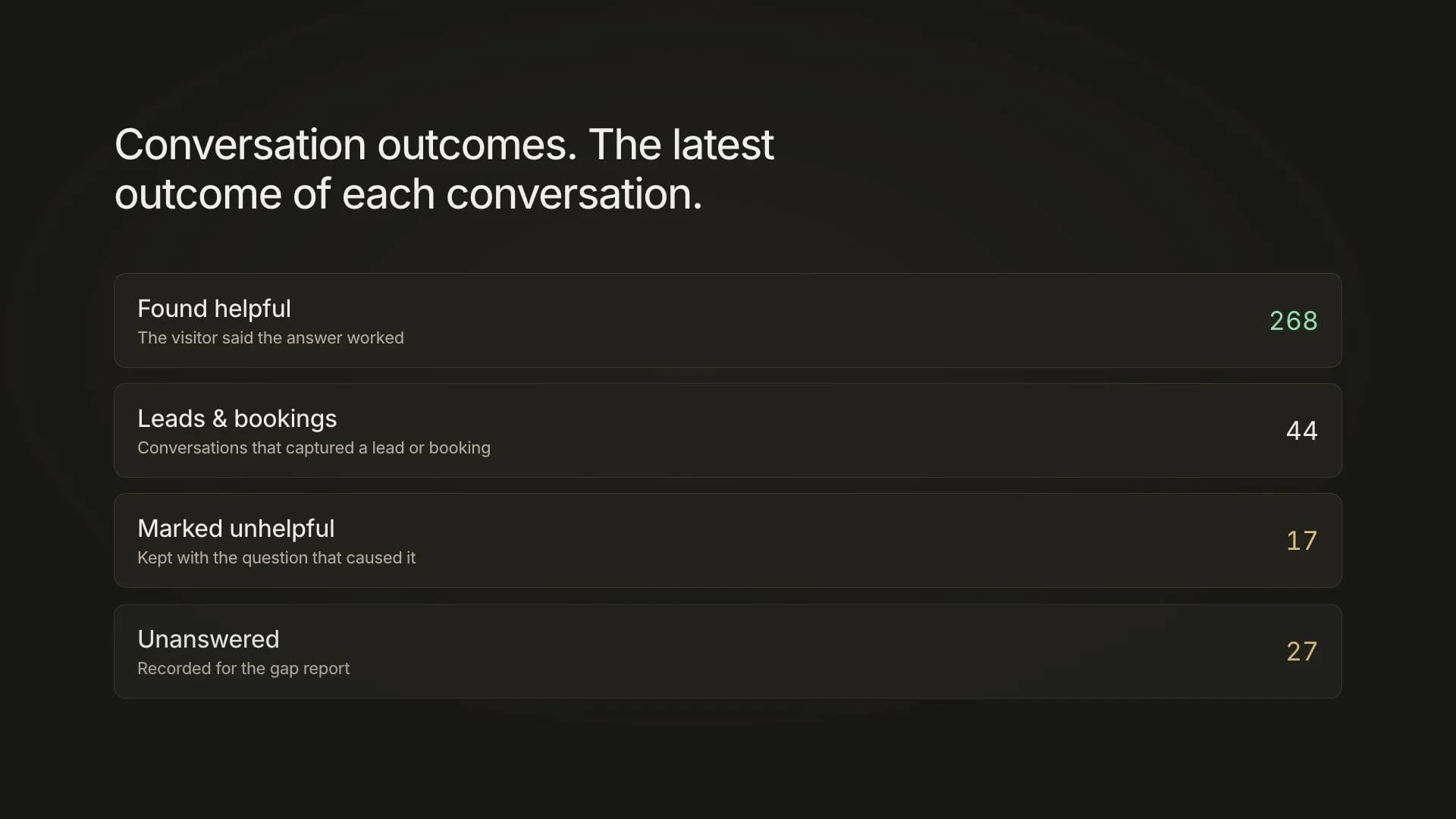
Outcomes, so you know what the conversations were for. And when people told you the answer was wrong, that’s recorded too, with the question that caused it. Out of hours is a different problem from unanswered, and it is counted differently. And you can look at any period you choose, not only the last thirty days. And if you run several sites, the same view across all of them.
- The gap report
Then the report that does the work. The questions people asked most, that your site never answered. Same-day visits. 9 times.
- The inbox
Search the whole inbox, not just this week. Filter it down to the conversations nobody has picked up yet. Open one and the whole conversation is there, with everything the visitor said around it. Every thread keeps its files and its transcript, and you can download either. Add a note. Assign it. Turn it into a lead with a follow-up date.
- Closing the gap
Then close it properly. Save the answer for the assistant, and fix the page it should have been on. Because a chat window is not a second place to keep your information. 27, down to 9.
- Export
Export the day-by-day numbers and take them into whatever you already report in. Sairo. Make the next visit better.
| Signal | What it tells you |
|---|---|
| Conversations | The number of conversation records that started within the selected period. |
| Leads | Conversations associated with at least one captured lead record. |
| Answered or unanswered | The recorded conversation outcome; review the transcript for quality. |
| Resolved | The team’s inbox status, which is separate from the AI outcome. |
| Daily trends | Conversation and lead counts grouped by UTC day. |
Compare like with like.
Start by choosing the same site and period length for a comparison. A newly installed site, a campaign, or an interrupted crawl can change the visitor mix and the number of questions the assistant can answer.
Agency members only receive reporting for sites within their project scope. A portfolio-wide total and a single client’s total describe different populations, even if their chart shapes look similar.
Use outcomes as a starting point for review.
An answered outcome means the system recorded an answer, not that an independent reviewer confirmed resolution. Likewise, a captured lead is not an attributed sale and a resolved inbox status is not a customer-satisfaction score.
Select a sample of conversations from an unexpected trend. Check the supporting source, whether the reply addressed the whole question, and whether a follow-up was completed. This gives the count an operational meaning.
Example: unanswered questions rise
If a new campaign attracts questions about a service not yet described on the site, the increase can reveal a content gap. Read the questions, add approved information, refresh the source, and compare a similar later period.
Ask the visitor, and report it honestly.
After an exchange the assistant can ask whether the answer helped. An unhelpful rating opens one optional comment box. The rating is stored with the question that prompted it, so a low score points at a specific thing to fix rather than a mood.
The summary reports how many people rated and how they split. It never presents a satisfaction rate over everyone who stayed silent, because most visitors do not rate and inventing a denominator would turn a handful of responses into a statistic your team cannot defend.
Turn the finding into a specific change.
Choose one intervention: improve a page, clarify a saved answer, adjust a greeting, or assign ownership of handoffs. Record the change date so a later comparison has context.
Keep a separate business measurement for qualified leads, completed follow-ups, or actual sales. Sairo’s current analytics cover the assistant’s recorded activity; they do not establish a causal return on investment.
Use the pattern you find as the starting point for Ask Sairo: locate representative conversations, read their source information and prepare a correction. For reporting in Claude, a permitted MCP connection can bring workspace records into that conversation.
Email destinations can opt into a weekly recap in Settings. The worker prepares one recap for the completed Monday-to-Sunday UTC week. Delivery activity shows queued, sent and failed notifications, with a retry action for failed deliveries.
Review what needs attention. Use visitor activity to choose the next improvement.
Before you start: Conversations have started arriving in your workspace. The workspace, visitors and figures shown are fictional examples.
Read the transcript
- See the pattern. Improve the answer.
Make a short review part of your week. Use Sairo's analytics to choose one useful improvement.
- Set the scope
Open Analytics. Choose the website and reporting period, then apply the filters. The report uses UTC calendar days.
- Read the signals
Compare conversations, leads and bookings, and capture rate. Look at unanswered outcomes for signs that visitors need information your assistant could not provide.
- Keep the context
Use the activity chart and outcome breakdown to understand the pattern. These outcomes describe conversations; they are different from the list of knowledge gaps still needing attention.
- Export if useful
Select Export daily report when you need a file for a team review. The export follows the report's selected filters.
- Find open gaps
Open Conversation inbox, choose Unanswered, and apply the filters. This view helps you find questions that still need a verified answer.
- Choose one fix
Open a conversation and read the actual question. Here, a visitor asked about skylight repairs. Confirm the answer with your team, then save it in Knowledge library.
- Review. Learn. Help the next visitor.
Choose one gap, save a confirmed answer, and check it. That simple weekly habit keeps your assistant useful as your business changes.