
Your website is the starting point.
Sairo reads permitted pages, extracts useful business details, and creates searchable knowledge for each website. Website ownership verification unlocks the full crawl; the public demo reads only a bounded sample.
Review included sources, exclude pages that should not inform replies, and add saved answers for questions your website does not address. Exact saved answers take priority over generated replies.
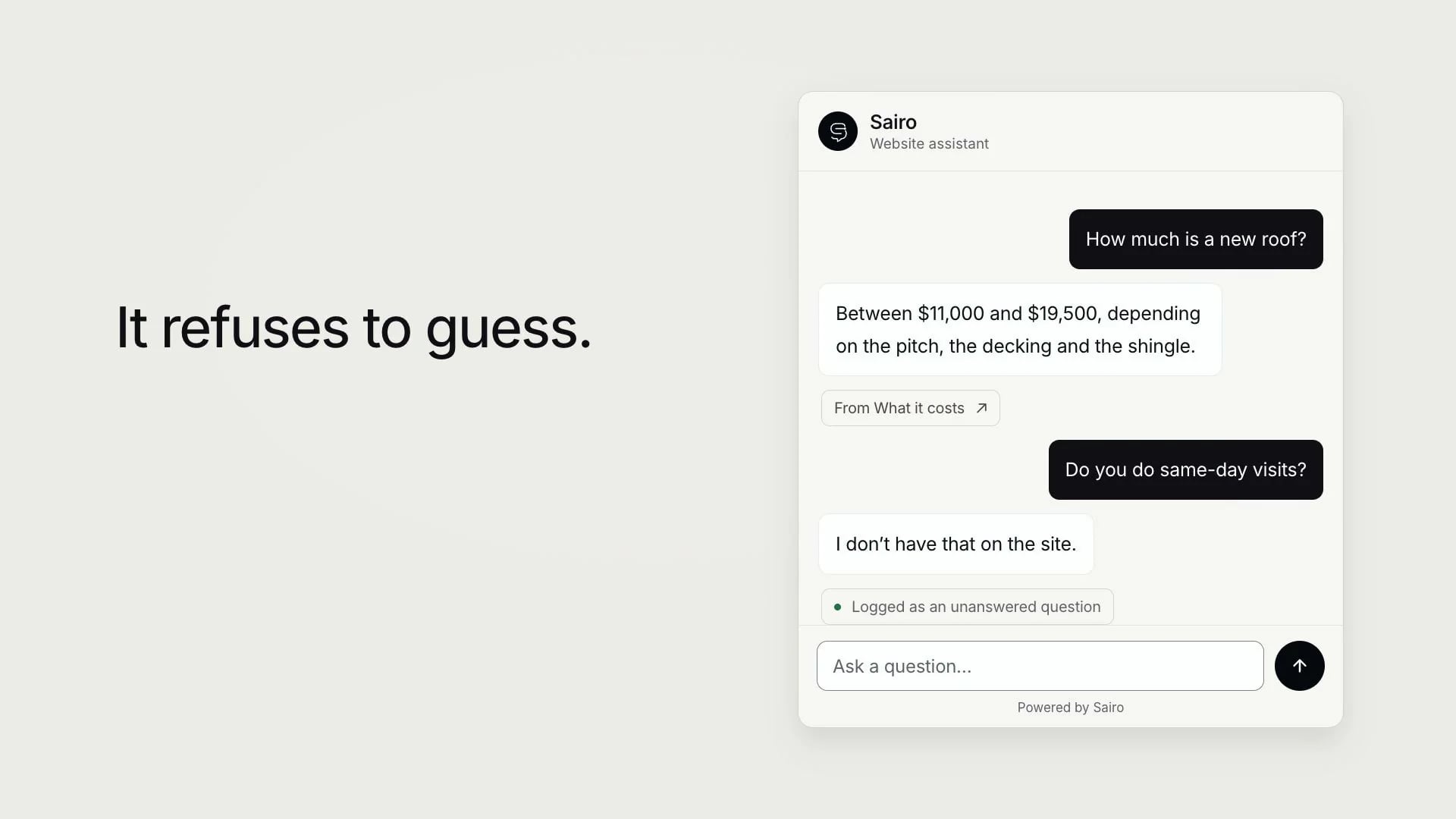
Answers from your own pages. Sairo reads the pages you choose, answers visitors from them and shows the source page. When your site doesn’t cover something, it says so and records the question for your team.
Narrated in an AI voice. The interface is recreated for film from Sairo’s own screens and copy; the businesses, visitors and figures are fictional examples.
Read the transcript
- Try a sample and verify ownership
Your website already has the answers. Your visitors just can’t find them. You start by pointing Sairo at your address. It checks the site is safe to fetch, respects robots.txt, and reads a limited sample. Verify that you own the site (a DNS record, or a small file) and the full crawl unlocks.
- The knowledge library
Sairo reads the pages you permit and turns them into searchable knowledge for that one website. You choose the sources. Exclude the old offers, the careers page, anything a visitor was never meant to be answered from. It pulls out the details that matter. Your hours, your address, your phone number, straight off the pages you approved. It reads your documents too. A price list, a policy, a specification sheet. And where the wording has to be exact, you save the answer yourself.
- Answering visitors from your pages
Then it goes to work. A visitor asks when you’re open. Sairo answers from your contact page, and shows which page it used. Asks what a new roof costs. Same again, from your pricing. And then asks something your website never said.
- It refuses to guess
Here is the part that matters. It doesn’t guess. It says it doesn’t have that, and it records the question. And it asks whether the answer helped, so you find out when it didn’t. If nobody is online, the visitor leaves a message and it stays with the conversation.
- Inbox and leads
That conversation lands in your inbox with the whole thread attached. Assign it, add a note, resolve it. If the visitor left a contact, it becomes a lead, with a stage and a follow-up date. And the gap becomes work you can actually do. Write the answer once, and it closes. Sairo. It refuses to guess.
- Page sources and citations
- Confirmed business details
- Saved answers and source exclusions
- PDF, Word, text, Markdown and CSV uploads
- A help centre whose articles are also knowledge
Keep the conversation connected to the work.
The assistant can collect contact details, record an unanswered question, and hand the same conversation to a live chat specialist when that site enables the feature. Your team can search the inbox, assign conversations, add internal notes, and track a lead through follow-up.
Live availability reflects whether an assigned specialist has set themselves Available. When nobody is available, the visitor is offered an honest team queue rather than an immediate-response promise.
When voice dictation is configured and enabled for a website, visitors can record a short question and have it converted to text in the composer. They can review the text before sending it. Dictation is an optional input method, with typing available throughout.
- Per-site live chat and specialist assignment
- Conversation ownership and lead follow-up
- Knowledge gaps from real questions
- Photo and PDF attachments
- Saved replies and grounded drafts for specialists
- Conversation rating with an optional comment
One site or a whole client portfolio.
Direct businesses get a focused workspace. Agencies can separate clients into projects, limit each person’s access, and apply branding at the appropriate level. Staff can assign plans and set model and usage allowances.
Analytics show conversations and outcomes over time. Use those patterns to decide which pages to improve and where your team should spend its attention.
Help for the team behind the assistant.
Ask Sairo brings visitor questions, website knowledge and follow-ups into a conversation for your team. Describe an incorrect answer, supply the right information, and review the proposed correction. Supported updates keep a change record and can be undone when the record has not changed again.
Prefer to work in Claude? Connect Sairo through MCP and OAuth, choose the workspace and website access, and use the same permitted read and change operations from a compatible application.
Explore each part of the workflow.
Understand what each feature does, how your team uses it, and where its limits are. Follow the work from visitor answers to the tools your team uses to maintain them.
Our next focus is releasing the apps.
Sairo for Android 1.0.0 has been submitted for Google Play production review. Closed testing remains available to invited testers, and the web app is available while native releases progress.
Accuracy includes a useful, complete answer.
A service name can be correct while leaving a visitor without the detail they need. Sairo’s existing answer workflow is designed to keep published service scope and pricing conditions together, check coverage of several-part questions and preserve a visible limit when information is unavailable.
Your team can inspect the sources, review transcripts and turn recurring gaps into maintained content. Use a repeatable set of real questions to evaluate the result for your website.