Connect your workspace to Claude and other AI applications.
Use Sairo’s remote MCP connection to find visitor conversations, review knowledge and work on follow-ups from a compatible AI application. Sign in to Sairo and choose a workspace, website scope and read or write access.
This connects your team’s workspace operations. The website widget is installed separately using the script and platform guides below.
Add the snippet from your workspace.
Open the website’s installation page in Sairo and copy its generated snippet. Add it to the shared page layout or an approved custom-code area so it loads on the intended pages.
The script is hosted at sairo.app and uses the public site key to load the correct assistant. The widget loads asynchronously and keeps its component styles inside Shadow DOM.
Add Sairo to the site you already have. One script from your workspace on WordPress, Webflow, Wix or anything else. Test it the way visitors will use it, make it look like your site, and keep the workspace on your phone.
Narrated in an AI voice. The interface is recreated for film from Sairo’s own screens and copy; the businesses, visitors and figures are fictional examples.
Read the transcript
- Platforms and the snippet
Add Sairo to the site you already have. WordPress, Webflow, Wix: there’s a guide for the platform you’re on. One script tag, from your workspace. The site key identifies the assistant. Your provider credentials stay on the server.
- Test a real journey
Then test it properly. Ask something your site answers. Ask something it doesn’t. And ask for a person. Then do it again with a keyboard, and with a screen reader, on your actual page.
- On the page, on a phone
Because that’s where it has to work. On your layout, next to your sticky header, on a phone. A visitor taps the launcher, asks, and gets the answer from your own page.
- Performance
And it costs your website almost nothing. 15 kilobytes. Zero layout shift. 10 milliseconds of blocking time. It waits its turn on the page, and it has a still image for anyone who asked for less motion.
- Make it yours
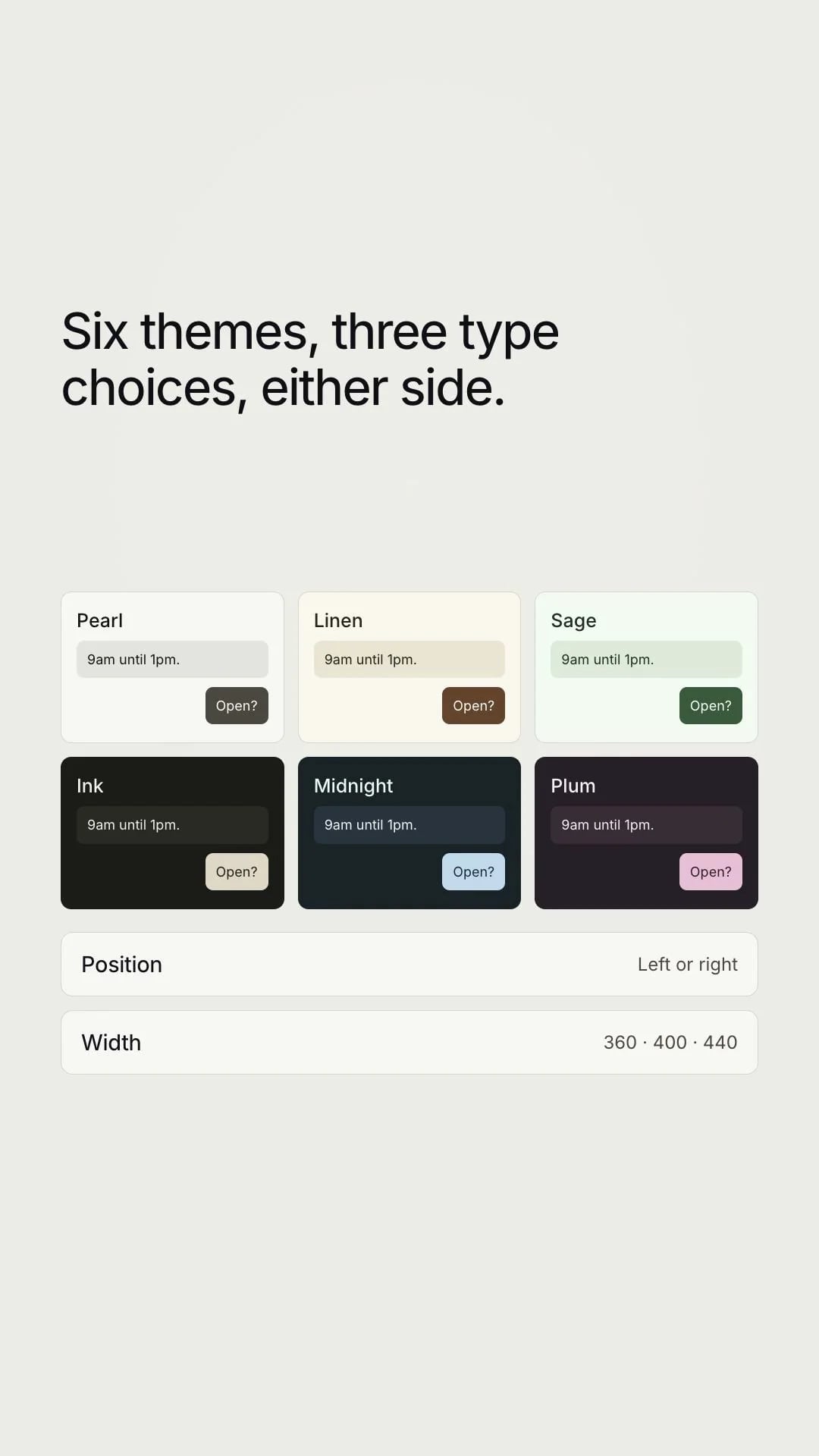
Put it on your own domain, so the chat lives at your address. Choose the language it replies in, and the hours it says you’re open. If somebody abuses your team, you can block them and end the chat. Make it yours. Six themes, three type choices, and the side of the screen it sits on.
- Integrations and guides
Connect it to the tools you already use, over MCP, including Claude. There are guides for all of it, with a short film on each one.
- The apps
The apps are still being prepared. iPhone and iPad are in internal testing, Mac is in App Store review follow-up, Windows and Android are in release preparation. The mobile app carries the same workspace. Inbox, live chat, leads, analytics, and Ask Sairo. One Sairo account, with access set by your team. Sairo. Add it to the site you already have.
Check what your CMS allows.
A custom website, WordPress installation, or site builder can host the widget when its plan and configuration permit third-party JavaScript. Use the CMS’s current instructions for adding site-wide scripts.
Sairo does not require a native CMS plugin, and this page does not claim a dedicated WordPress, Shopify, Webflow, or Wix integration. Content security policies and consent tools may need an explicit allowance for the widget and its requests.
Let the assistant reach a system you run.
A website can register up to ten actions: an HTTPS endpoint you own, with a short description of when to use it. The assistant may run at most two in a reply, and answers only from what they return, so an order lookup or a stock check reaches the visitor as evidence rather than as a guess.
Sairo accepts only addresses that resolve to public hosts, and re-checks that when the call is made rather than only when it is saved. Every call is recorded with the address, what was sent and what came back, for your team to read. You build and maintain the endpoint; Sairo does not host it.
A REST API for the work you automate.
Websites, conversations, leads and saved answers are readable and writable with a bearer key, so an agency can report across clients or push a lead into its own CRM without a person copying it. Read and write are separate scopes.
A key is stored as a hash with a short visible prefix: you can recognise it in a list, and nobody can read it back. Revoking one takes effect immediately.
WhatsApp, when the service supports it.
Sairo can answer messages sent to a business WhatsApp number with the same assistant, the same knowledge and the same refusal to guess, inside WhatsApp’s 24-hour reply window. The window is recorded and checked rather than discovered as a failed send.
This is built but not available in the current hosted service, because no Twilio account is connected to it. Contact Sairo before planning a rollout around it, so you are told the real date rather than a hopeful one.
Review the production installation.
Confirm that the widget appears only where intended, the correct business name and branding are shown, and replies are grounded in the right website.
Check keyboard operation, focus, page overlays, zoom, and mobile layouts. If live chat is enabled, test its online, offline, waiting, connected, and ended states on the published site.
Find your website platform.
Follow the custom-code route for your platform. Each guide covers prerequisites, script placement, publishing, and checks on the visitor-facing website. These are instructions for the Sairo JavaScript embed, rather than a catalogue of native plugins.